


 Español
 Deutsch
 日本語
日本語 한국어
한국어
Vehicle interior buttons
Vehicle Interior Buttons: Functionality and Design The interior of a modern vehicle is equipped with a variety of buttons that allow drivers and passengers to control different functions with ease. These buttons are strategically placed for accessibility, ergonomics, and safety, ensuring a seamless driving experience. 1. Dashboard and Steering Wheel Controls The dashboard houses essential buttons for operating the vehicle’s core systems. Common controls include the ignition button, hazard lights, and climate control settings. Many vehicles also feature touch-sensitive or physical buttons for adjusting temperature, fan speed, and air distribution. The steering wheel often integrates multifunction buttons for hands-free operation. These may include audio controls (volume, track selection), voice command activation, and cruise control settings. Some vehicles even have paddle shifters behind the steering wheel for manual gear changes in automatic transmissions. 2. Infotainment and Connectivity The center console typically features an infotainment system with physical or touch-sensitive buttons. These controls allow users to navigate menus, adjust audio settings, and connect smartphones via Bluetooth. Common buttons include volume knobs, home screen shortcuts, and climate control toggles. 3. Climate and Comfort Controls Dedicated buttons for heating, ventilation, and air conditioning (HVAC) are usually located on the center stack. These include temperature adjustments, seat heating/cooling, and defroster functions. Some luxury vehicles even offer separate rear climate controls for passengers. 4. Safety and Assistance Systems Modern vehicles include buttons for advanced driver-assistance systems (ADAS). These may include lane-keeping assist, parking sensors, and collision avoidance settings. The electronic stability control (ESC) and traction control buttons are also commonly found near the driver’s seat. 5. Window and Door Controls Power window switches are typically mounted on the door panels, allowing easy operation for all occupants. Central locking buttons, mirror adjustments, and child lock toggles are also placed within reach of the driver. 6. Lighting and Visibility Buttons for interior lighting, headlight adjustments, fog lights, and rearview mirror dimming are usually located on the dashboard or steering column. Some vehicles include automatic light sensors, reducing the need for manual adjustments. Design and Ergonomics Manufacturers prioritize intuitive layouts, with frequently used buttons placed closest to the driver. Tactile feedback, backlighting, and clear labeling enhance usability, especially in low-light conditions. Conclusion Vehicle interior buttons play a crucial role in ensuring convenience, safety, and comfort. As technology evolves, touchscreens and voice commands are becoming more common, but physical buttons remain essential for quick, distraction-free operation. Their thoughtful placement and design contribute significantly to an efficient and enjoyable driving experience.
Products
Category:
-
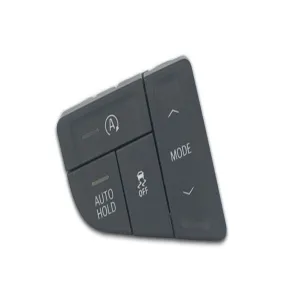
Automotive button components
Category: AutomotiveBrowse number: 13Number:Release time: 2025-12-16 14:02:14Automotive button components are precision parts used in vehicle control interfaces, including dashboards, steering wheels, center consoles, and door panels. They are designed to deliver reliable tactile feedback, consistent actuation force, and long service life under frequent use. Common materials include engineering plastics, silicone rubber, and metal inserts, selected for durability, temperature resistance, and surface finish quality. These components are manufactured through injection molding, overmolding, and surface treatment processes to meet automotive standards. Automotive button components support functions such as climate control, infotainment, lighting, and safety systems, contributing to intuitive operation and enhanced user experience in modern vehicles.
News
Category:
No search results found!
Case
Category:
No search results found!
Video
Category:
No search results found!
Download
Category:
No search results found!
Job
Category:
No search results found!
Featured Products
No search results found!



 WhatsApp
 Phone
Phone